Crawl budget is one of those SEO terms that gets thrown around a lot, often by people trying to sound technical, and it ends up scaring small business owners into worrying about something that has nothing to do with their site. So let's start simply, and build up from there.
What Crawl Budget Actually Is
Google doesn't have unlimited time or resources to crawl every website on the internet every single day. So it makes decisions. For each site, Google roughly decides how many pages it's willing to crawl in a given period, and how often it's willing to come back and check for changes. That allocation is what people mean by crawl budget.
Think of it like a mail carrier with a route. They can't spend all day at one house. They have a certain amount of time to cover their route, and they prioritize based on what seems important — a house with a “please deliver here first” sign gets checked before an abandoned building at the end of the street that hasn't had mail in years.
Google's crawler, Googlebot, works similarly. It has a general sense of how much time to spend on your site based on two things mainly: how important or popular your site seems to be, and how efficiently your site lets it crawl without wasting time on dead ends, errors, or duplicate junk.
Why This Term Causes So Much Unnecessary Worry
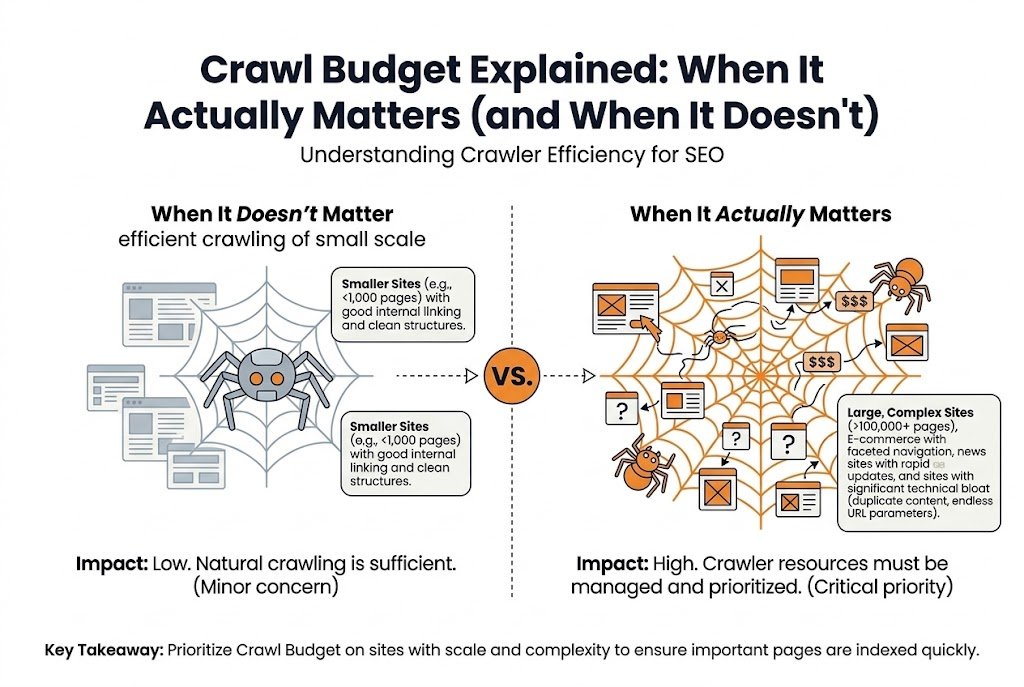
Here's the part that gets lost when people talk about crawl budget: it only becomes a real constraint at a certain scale. If your site has thirty pages, or even three hundred pages, Google can crawl your entire site in one visit without breaking a sweat. There's no meaningful “budget” being exhausted, because you're not asking Google to do very much work in the first place.
Crawl budget starts mattering when a site has tens of thousands of pages, sometimes hundreds of thousands. That's usually large ecommerce catalogs, big publishers with years of archived content, or sites with automatically generated pages — filters, search result pages, tag archives — that multiply URL count far beyond what a human would ever manually create.
If you run a local plumbing company with a homepage, five service pages, and a few location pages, crawl budget is almost never going to be the reason your site isn't ranking well. Something else is going on — thin content, weak backlinks, poor on-page targeting — and it's worth looking there first instead of chasing a technical concept that doesn't apply at your scale.
When Crawl Budget Genuinely Matters
For larger sites, though, this becomes real. Picture an ecommerce store with eighty thousand product pages, and on top of that, filtering options for size, color, price range, and availability, each combination generating its own unique URL. Suddenly you're not looking at eighty thousand pages. You might be looking at several hundred thousand crawlable URLs, most of which are near-duplicates of each other with a filter parameter tacked onto the end.
Googlebot doesn't know automatically that ninety percent of those filtered URLs aren't worth indexing. It has to crawl them to figure that out, and every one it crawls is time not spent crawling something more valuable — a new product page, an updated blog post, a page that actually needs to be re-checked because something changed.
This is where crawl budget becomes a genuine limiting factor. Important, valuable pages can sit uncrawled or infrequently recrawled for weeks, not because anything is technically broken, but because Google's attention is spread too thin across too many low-value URLs. This is the same mechanism we cover in Why Google Isn't Indexing Your Pages (7 Real Causes), seen from the crawl side rather than the indexing side.
Signs Your Site Might Actually Have a Crawl Budget Problem
A few patterns tend to show up together when this is a real issue. New pages take an unusually long time to get crawled and indexed after publishing, sometimes weeks instead of days. Search Console's crawl stats report shows Googlebot spending a large share of its requests on URL patterns that don't matter much — filtered category pages, session ID parameters, internal search result pages. And when you check log files, if you have access to them, you can literally see Googlebot repeatedly requesting the same low-value URLs while barely touching newer, more important sections of the site.
None of these signs mean much in isolation on a small site. A new page taking a few extra days to get crawled on a five-hundred-page site is completely normal and not a crawl budget issue. The same delay on a site with half a million URLs, concentrated specifically in the newest and most important section of the site, is a different story.
How Large Sites Actually Fix This
The fix isn't asking Google for a bigger budget, since that's not something you can directly request. It's reducing how much of that budget gets wasted on URLs that don't deserve attention.
Blocking low-value parameter combinations in robots.txt is one lever, preventing Googlebot from even attempting to crawl filter combinations that generate near-infinite duplicate variations. Consolidating near-duplicate pages with canonical tags helps Google understand which version of a page actually matters, so it stops treating five URLs as five separate things worth re-crawling individually. Cleaning up or redirecting old, expired, or thin pages removes dead weight that Googlebot might otherwise keep checking out of habit. And making sure the XML sitemap only contains URLs actually worth crawling gives Google a clearer signal about where to focus.
Server response speed plays a role too, though it's less talked about. A site that responds quickly to crawl requests allows Googlebot to fit more crawling into the same time window. A slow, overloaded server effectively shrinks the practical crawl budget, since Google backs off crawling a site it detects is struggling to keep up.
The Honest, Simple Version
If you're running a small to mid-sized website, crawl budget is very unlikely to be your problem, and it's usually not worth spending much time on. If you're running a large site with tens of thousands of pages or more, particularly one with a lot of automatically generated URLs, it's worth checking Search Console's crawl stats and thinking seriously about which sections of the site are worth Googlebot's limited time.
The size of the site is really the whole story here. Crawl budget isn't a mysterious technical setting hiding somewhere in your site's code. It's a reflection of how much crawling work your site is asking Google to do, and whether that work is spent on pages that matter or pages that don't. For a practical framework on finding and prioritizing these issues, our Complete Technical SEO Audit Guide (2026) walks through the full process.
FAQ
How many pages does a site need before the crawl budget becomes a concern?
There's no exact cutoff, but it generally starts becoming relevant somewhere in the tens of thousands of pages, particularly when a large share of those pages are automatically generated, like filtered or parameter-based URLs. A site with a few hundred or even a few thousand well-structured pages usually doesn't need to think about this at all.
Can I ask Google directly for a bigger crawl budget?
No, there's no request form or setting that increases it directly. The practical approach is reducing how much of the existing budget gets wasted on low-value URLs, which effectively frees up more crawling attention for pages that matter.
Does a faster website increase crawl budget?
It can help indirectly. A site that responds quickly to crawl requests allows Googlebot to fit more crawling into the same window of time, while a slow or overloaded server can cause Google to back off and crawl less to avoid straining the site further.
Is the crawl budget the same as indexing?
No, and they're often confused. Crawl budget determines whether and how often Google crawls a page in the first place. Indexing is a separate decision Google makes afterward, based on whether the page is worth including in search results once it's been crawled.
Will blocking low-value URLs in robots.txt hurt my SEO?
Not if done correctly. Blocking genuinely low-value pages, like filter parameter combinations or internal search result pages, generally helps by freeing up crawl attention for important pages. Problems only arise if robots.txt accidentally blocks pages that should be crawled and indexed.
Crawl budget is a real constraint for large sites and largely a red herring for small ones. If your site has tens of thousands of URLs and important pages are crawling slowly, block the low-value parameter URLs, consolidate duplicates, and clean up dead pages before assuming anything else is wrong.
If you'd rather have a team work through crawl, indexing, and Core Web Vitals for you, that's exactly what our technical SEO audits service is built to do — starting with a prioritized list of what actually matters for your site.
Related Guides
More from the same part of the roadmap — same category first, newest first.