Most technical SEO audits fail for the same reason. Someone runs a crawler, exports a spreadsheet with two hundred flagged issues, and hands it to a client or a dev team with no sense of which ten items matter and which hundred and ninety don't. Nobody works through a list that long. It gets skimmed, a few obvious items get fixed, and the rest sits in a tab that never gets reopened.
A technical audit is only useful if the findings are prioritized and implemented. That sounds obvious written down, but it's the single biggest gap between audits that change a site's performance and audits that produce a document nobody acts on. This guide walks through how to structure an audit around impact rather than volume, and how to decide what actually deserves a developer's time this quarter.
Start with What the Site Is Trying to Rank For
Before opening a crawler, it helps to know what the site's priority pages are. A twelve-page local service site and a forty-thousand-page ecommerce catalog need different audits, not because the underlying principles change, but because where the risk concentrates is different. On a small site, a handful of misconfigured pages can be a meaningful share of total traffic. On a large site, the same handful of pages might be statistically irrelevant, while a templating issue affecting ten thousand URLs at once is the real story.
This is why running a crawler first and asking questions later produces bloated, unfocused audits. Knowing which pages drive revenue, which pages are meant to rank for competitive terms, and which sections of the site are new versus legacy changes how you read the same crawl data.
Crawlability Comes First
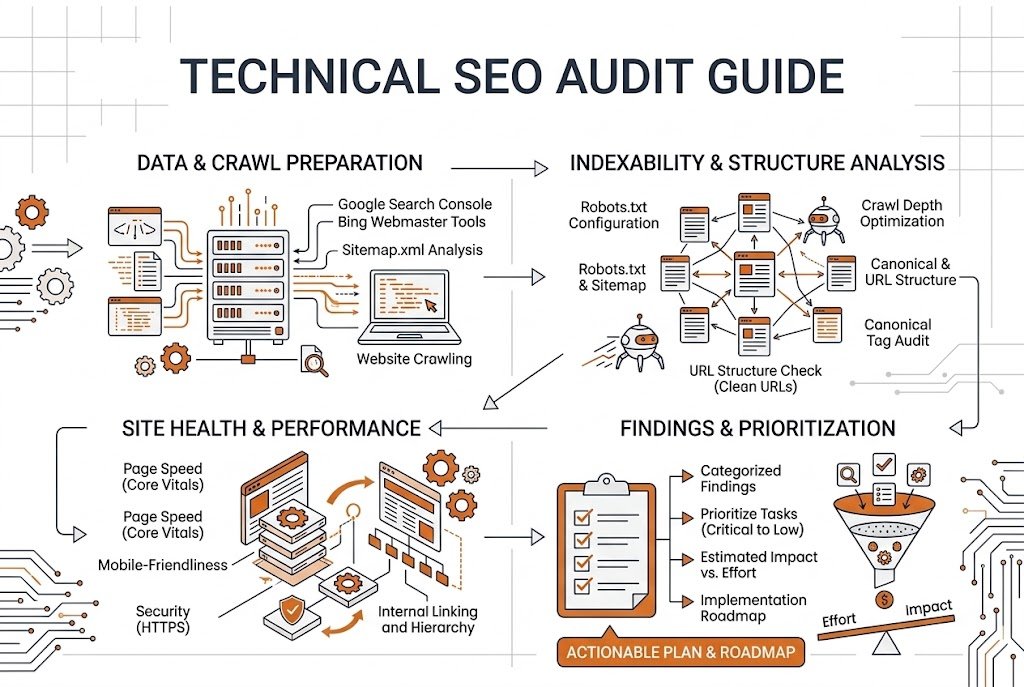
If Googlebot can't reach a page efficiently, nothing else about that page matters yet. This is the first layer of any audit, and it's worth separating into a few distinct checks rather than treating “crawlability” as one item.
Robots.txt deserves a manual read, not just a crawler flag. Rules get added over time, sometimes to solve a short-term problem, and never get removed once that problem is gone. A disallow rule blocking an entire directory that used to be a staging path but now overlaps with live content is a common find.
Crawl depth matters more than most checklists give it credit for. A page that requires five or six clicks from the homepage to reach is deprioritized by Google's crawlers, even with no explicit block in place. Flattening site architecture so important pages sit two or three clicks from the homepage is one of the more reliable ways to improve how consistently a section of the site gets crawled and refreshed.
Redirect chains are worth a specific pass. A single redirect is fine. Three or four redirects stacked on top of each other, often the result of multiple migrations over the years, slow down crawling and occasionally break entirely if one link in the chain fails.
On very large sites, this whole layer ties into how much crawling attention Google can give you at all — something we've written about separately in Crawl Budget Explained: When It Actually Matters.
Indexation Health, Without Repeating the Obvious
We've covered the specific reasons pages fail to index in detail in Why Google Isn't Indexing Your Pages (7 Real Causes). An audit doesn't need to re-explain each of those from scratch. What an audit needs to do is quantify the pattern at scale.
Pull the Page Indexing report in Search Console and look at the ratio between submitted and indexed URLs. A small gap is normal on almost every site. A large gap, particularly one concentrated in a single template or URL pattern — product pages, tag pages, paginated archives — points to a systemic issue rather than isolated one-off problems. This is where an audit earns its keep: not by listing every unindexed URL individually, but by identifying which template or section is responsible for most of them.
Log file analysis, when it's available, adds a layer most crawler-only audits miss. A crawler tells you what's theoretically reachable. Log files tell you what Googlebot actually requested, how often, and which sections it's spending the most time on. This is a more advanced step, and it's not always necessary for smaller sites, but for anything past a few thousand URLs it's often the fastest way to find where crawl attention is actually going.
Core Web Vitals, Measured the Way Google Measures Them
Core Web Vitals get treated as a single pass-or-fail line item in a lot of audits, which undersells how much nuance sits underneath the three metrics. Largest Contentful Paint, Interaction to Next Paint, and Cumulative Layout Shift each fail for different reasons, and fixing one doesn't fix the others.
LCP issues usually trace back to a specific resource — a hero image that's too large, a render-blocking script loading before the main content, a slow server response delaying everything downstream. The fix is almost always specific to that one resource once you've identified it in a tool like PageSpeed Insights or Lighthouse.
INP, which replaced First Input Delay as a Core Web Vitals metric, measures how responsive a page feels during actual interaction, not just how fast it loads. A page can load quickly and still feel sluggish if a heavy JavaScript bundle blocks the main thread every time someone clicks something.
CLS problems are usually the easiest to diagnose and among the most annoying to experience — images or ads loading without a reserved space, causing the page to jump while someone's trying to read or tap something. Setting explicit width and height attributes on images and reserving space for ad slots before they load resolves most CLS issues.
The mistake in a lot of audits is reporting these three metrics as a single Core Web Vitals score without breaking out which one is actually failing and why. A site can pass on mobile and fail on desktop, or vice versa, and field data from real users, through the Chrome User Experience Report, sometimes tells a different story than lab data from a single test run.
Structured Data and Mobile-First Indexing
Schema does not automatically make a page rank, but it does help search engines understand what a page is about and enables specific result types — review stars, FAQ dropdowns, product pricing — that can improve click-through rate even without a ranking change. An audit should check whether existing structured data validates, since a schema block with errors is often worse than no schema at all, and whether the site is using schema types that actually match its content.
Mobile-first indexing means Google predominantly uses the mobile version of a site for indexing and ranking. If mobile and desktop versions of a page differ meaningfully, it's the mobile version's content that Google is primarily working from, and an audit should flag any gap between the two.
JavaScript Rendering, When It's Relevant
Not every site needs a deep JavaScript rendering audit, but sites built on heavy client-side frameworks do. Google can render JavaScript, but it happens in a second wave after initial crawling, and it doesn't always happen quickly or completely on larger sites. Checking whether critical content — main body text, key links, product details — is present in the initial HTML response versus only appearing after JavaScript executes is worth doing specifically for JS-heavy sites.
Prioritizing What You Found
This is the part most audits skip, and it's the part that actually determines whether anything gets fixed. Once the crawl data, Search Console reports, and Core Web Vitals data are in front of you, sort findings by two factors: how much traffic or revenue the affected pages carry, and how much effort the fix requires.
A noindex tag mistakenly applied to a high-traffic category page is high impact and usually low effort — a five-minute fix once found. A site-wide JavaScript rendering issue affecting every product page is high impact but potentially weeks of development effort. A redirect chain on a page that gets four visits a year is low impact regardless of effort. Sorting findings into a simple grid, impact against effort, turns a two-hundred-item spreadsheet into a short list of things worth doing this month, a medium list worth scheduling for the quarter, and a long tail that can reasonably wait.
This depends on the site's resources as much as the findings themselves. A site with a full-time developer can absorb more medium-effort fixes in a given month than a site relying on an outside contractor for a few hours a week.
What a Finished Audit Should Actually Contain
A useful technical audit isn't a list of every issue a crawler can detect. It's a short, ordered set of findings that explains what's wrong, why it matters for this specific site, and what fixing it is likely to affect. For each item, that means naming the affected pages or template, describing the mechanism, and giving a realistic sense of effort required.
It's worth being honest about what an audit can't promise. Fixing crawl and indexing issues removes obstacles, but it doesn't guarantee a ranking increase by a specific date, since rankings depend on relevance and competition as much as technical health. What a good audit can promise is that Google will have fewer reasons to struggle with the site afterward.
Tools Worth Using, and Where They Fall Short
Screaming Frog or a similar crawler remains the backbone of most audits, handling crawlability, redirects, status codes, and basic on-page elements at scale. Google Search Console fills in what a crawler can't see on its own: actual indexing status, real search queries, and field data from real users. PageSpeed Insights and Lighthouse handle the performance side, though lab data from a single test run should be checked against real-world field data when it's available.
None of these tools replaces judgment. A crawler will happily report a thousand issues with equal visual weight — a missing meta description treated the same as a site-wide noindex tag. Reading the output critically, and deciding what actually deserves attention based on the site's specific traffic patterns and business priorities, is the part that separates a useful audit from an intimidating spreadsheet nobody opens twice.
FAQ
How often should I run a full technical SEO audit?
For most sites, once or twice a year is reasonable, with lighter monitoring in between through Search Console alerts and periodic crawls. Larger sites with frequent template changes often benefit from more frequent checks, since a single templating mistake can affect thousands of pages before anyone notices.
Do I need a developer to fix most technical SEO issues?
It depends on the finding. Things like a missing meta description or an incorrect canonical on a single page can sometimes be handled through an SEO plugin. Site-wide issues — JavaScript rendering problems, Core Web Vitals fixes tied to code, redirect chain cleanup at scale — usually need developer involvement to resolve properly.
Is Core Web Vitals a ranking factor or just a user experience metric?
Both, though the weight varies by query and competition. Page experience signals, including Core Web Vitals, are one of many ranking factors, generally acting more as a tiebreaker between otherwise similar pages than as a dominant signal on its own.
Should a small business site worry about the crawl budget?
Generally not much. Crawl budget becomes a meaningful concern once a site has tens of thousands of URLs or more. A small site with a few dozen or even a few hundred pages is unlikely to run into crawl budget limitations.
What's the difference between a technical SEO audit and a full SEO audit?
A technical audit focuses specifically on crawlability, indexing, site speed, and related infrastructure issues. A full SEO audit typically also covers content quality, keyword targeting, and backlink profile, which sit outside what a technical audit is meant to diagnose.
A technical audit pays off when it's prioritized against impact and effort, not when it produces the longest list. Know which pages matter before you crawl, look for systemic issues rather than one-off fixes, and be honest about what the audit can and can't promise.
If you'd like a prioritized audit like this done on your site, start with technical SEO audits. We'll separate the findings that matter from the spreadsheet noise before recommending anything.
Related Guides
More from the same part of the roadmap — same category first, newest first.